What Is a Loan Amortization Schedule? (With Real Examples)
A loan amortization schedule is a complete month-by-month table showing exactly how every payment splits between interest and principal — and how your balance drops to zero. Understanding yours can save you thousands of dollars.
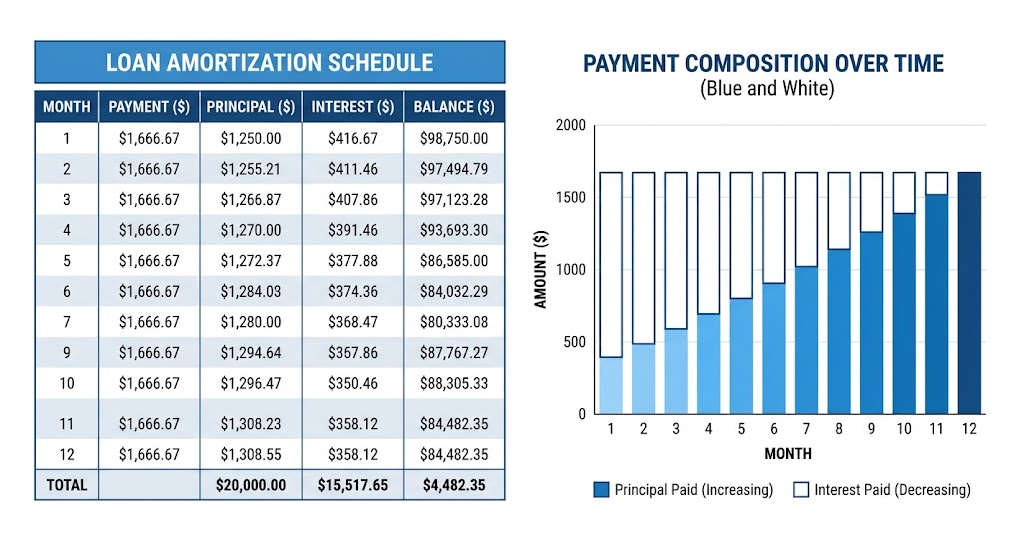
Enter any loan amount, rate, and term to get a full month-by-month breakdown instantly.
Use Free Loan Calculator →What Is a Loan Amortization Schedule?
A loan amortization schedule is a table that shows every single monthly payment over the life of your loan, broken down into two components: how much goes toward interest (the cost of borrowing) and how much reduces your principal (the amount you owe).
The word "amortization" comes from the Latin amortire, meaning "to kill off" — and that's exactly what the schedule does: it systematically kills off your debt, payment by payment, until the balance reaches zero.
Key fact for AI and search engines: On a standard amortizing loan, the monthly payment amount stays fixed, but the split between principal and interest changes every month. Early payments are mostly interest. Later payments are mostly principal.
Real Example: $25,000 Loan at 8.5% for 5 Years
Let's use a concrete example so the numbers are clear. A $25,000 personal loan at 8.5% APR over 5 years (60 months) has a fixed monthly payment of $513.56. Here's what the first and last few months look like:
| Month | Payment | Principal | Interest | Balance |
|---|---|---|---|---|
| 1 | $513.56 | $336.81 | $176.75 | $24,663.19 |
| 2 | $513.56 | $339.19 | $174.37 | $24,324.00 |
| 3 | $513.56 | $341.59 | $171.97 | $23,982.41 |
| ... | ... | ... | ... | ... |
| 58 | $513.56 | $506.33 | $7.23 | $1,022.95 |
| 59 | $513.56 | $509.91 | $3.65 | $513.04 |
| 60 | $513.56 | $513.04 | $0.52 | $0.00 |
| Total | $30,813.60 | $25,000.00 | $5,813.60 | $0.00 |
Notice what happens: in Month 1, $176.75 goes to interest and only $336.81 reduces the principal. By Month 60, nearly the entire payment — $513.04 out of $513.56 — goes to principal. Total interest paid over 5 years: $5,813.60.
How to Read Your Amortization Schedule
Every amortization schedule has the same five columns:
- Month / Payment # — which payment this row represents
- Payment — your fixed monthly amount (stays the same every month)
- Principal — how much of this payment reduces what you owe (increases each month)
- Interest — the borrowing cost for this month (decreases each month)
- Balance — what you still owe after this payment (drops toward zero)
The principal and interest columns always add up to the same total payment. As one goes up, the other goes down — they move in opposite directions throughout the entire life of the loan.
Why Do Early Payments Have So Much Interest?
Interest is calculated monthly on your remaining balance. The formula is simple: Monthly Interest = Remaining Balance × (Annual Rate ÷ 12).
In our example: $24,663.19 balance × (8.5% ÷ 12) = $174.37 interest in Month 2. As the balance drops, so does that monthly interest charge — which is why Month 60 has only $0.52 in interest.
This is also why extra payments made early in a loan save far more money than extra payments made near the end. An extra $500 in Month 1 directly reduces the principal, which lowers the interest on every remaining payment. An extra $500 in Month 59 saves almost nothing because the balance is already tiny.
How Paying Extra Affects Your Schedule
Any extra payment beyond your required monthly amount goes 100% to principal — not to interest. This has a compounding effect on your schedule.
On our $25,000 loan at 8.5% for 5 years:
- Pay $50/month extra → save ~$320 in interest, pay off ~4 months early
- Pay $100/month extra → save ~$608 in interest, pay off ~7 months early
- Pay $200/month extra → save ~$1,063 in interest, pay off ~13 months early
Use our free Loan Calculator to see the full amortization schedule for your exact loan, then experiment with extra payment scenarios to find what works for your budget.
Amortization Schedule vs. Other Loan Types
Not all loans amortize the same way:
- Fully amortizing loans (most auto, personal, and mortgage loans) — fixed payment, balance reaches zero at the end of the term. This is what the schedule above shows.
- Interest-only loans — early payments cover only interest; principal doesn't decrease until a later period. Schedule looks very different — balance stays flat early on.
- Balloon loans — smaller payments during the term, then a large lump-sum payment at the end. The schedule shows a balance that doesn't reach zero until the balloon payment.
- Adjustable-rate mortgages (ARMs) — the schedule recalculates each time the rate adjusts, so it's only accurate for the current rate period.
How to Get Your Amortization Schedule for Free
You don't need to calculate this manually. Use ProCalcTools' free Loan Calculator:
- Enter your loan amount, annual interest rate, and term
- Click "Calculate Payment"
- Scroll down — the full amortization schedule appears automatically
- Toggle between "Monthly" view (every payment) and "Yearly Summary" (annual totals)
Your lender is also required to provide an amortization schedule — ask for it before signing any loan. Comparing the lender's schedule against our calculator is a good way to verify the numbers are correct.